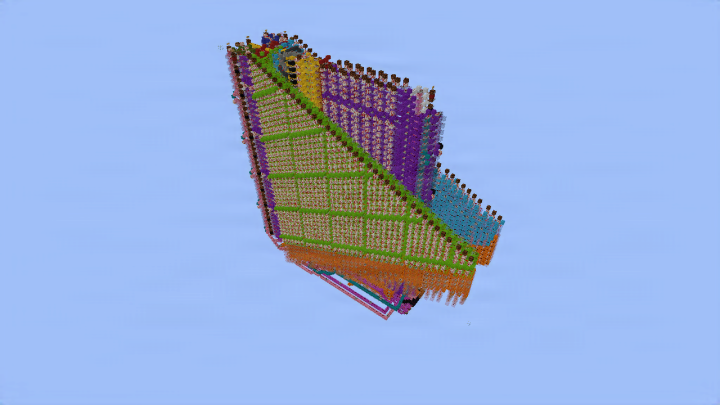

 minecraft
 redstone
 logic
logic
This is a unit that does the CORDIC algorithm, which is a simple iterative algorithm that only uses additions, subtractions & shifting to compute functions like sine, cosine and much more.
The algorithm can be done in 6 different settings, yielding different functions. We choose between
-
3 Coordinate Systems: Circular, Linear, Hyperbolic
-
2 Modes: Rotation, Vectoring
Each pair of Coordinate System & Mode computes a different function, e.g. Circular Rotation is used for computing sine & cosine.
This unit uses binary fixed point numbers in signed Q3.37 format (using twos complement), i.e. we have one sign bit, two integer bits, and 37 fractional bits. It can do 38 iterations at max.
The inputs are located a bit awkwardly, we have:
-
x,y inputs at the sides
-
phi input at the front
-
Coordinate System & Mode selection at the front at the bottom
-
Panel for selecting total number of iterations, Clock button & Reset button at the right side
-
Outputs at the back
The functions we can compute are
-
Sin, Cos: Circular Rotation. Inputs: phi. Outputs: x≈cos(phi), y≈(phi). Input range: approx. [-1.57, 1.57]
-
Arctan: Circular Vectoring. Inputs: x,y. Outputs: phi≈arctan(y/x). Input range: |y/x| =< 1 is sufficient, but theoretically approx. |y/x| =< 5.758 should work too
-
Sinh, Cosh: Hyperbolic Rotation. Inputs: phi. Outputs: x≈cosh(phi), y≈sinh(phi). Input range: approx. [-1.1181, 1.1181] Atanh: Hyperbolic Vectoring. Inputs: x,y. Outputs: phi≈atanh(y/x). Input range: approx. |y/x| =< 0.8
-
Multiplication: Linear Rotation. Inputs x, phi. Output: y≈xphi. Input range: phi between -2 and 2, and xphi must fit in Q3.37
-
Division: Linear Vectoring. Inputs x,y. Output: phi≈y/x. Input range: y/x must be between -2 and 2.
Multiplication and Division are just for fun and not really that useful, e.g. you can't compute 2*2 with this. I only inlcuded them because they didn't take up any additional space or slow anything down. Any normal multiplier or divider will be better.
Clock Speed:
-
Rotation: 32rt per iteration
-
Vectoring: 36rt per iteration
Java only.
72,714
Blocks
205,344
Volume
93 × 96 × 23
Dimensions
schem
Format
More like this
View all
Creeper Farm
Jxtgaming • ID: 3-ZE5F
Gold Farm with storage system
Teletubis_11 • ID: mlUMa9
Knoster Charcoal V1 -by Konst4638
Konst4638 • ID: J-P5NS
Konsts Tnt Minecart Crafter
david191919 • ID: CjjoZJ
Donut SMP flooding machine
Aestrul_ • ID: PuGXbn